
Cloud Documentation AWS
3.19.x
AWS Quick Start Guide
AWS User Guide
Title
Message
Create new category
What is the title of your new category?
Edit page index title
What is the title of the page index?
Edit category
What is the new title of your category?
Edit link
What is the new title and URL of your link?
Canceling Your Subscription
AI Tools
Summarize Page
Copy Markdown
Open in ChatGPT
Open in Claude
Connect to Cursor
Connect to VS Code
Before canceling your subscription, make sure you delete CF and clean all AWS resources related to the deployment.
Once all resources are deleted:
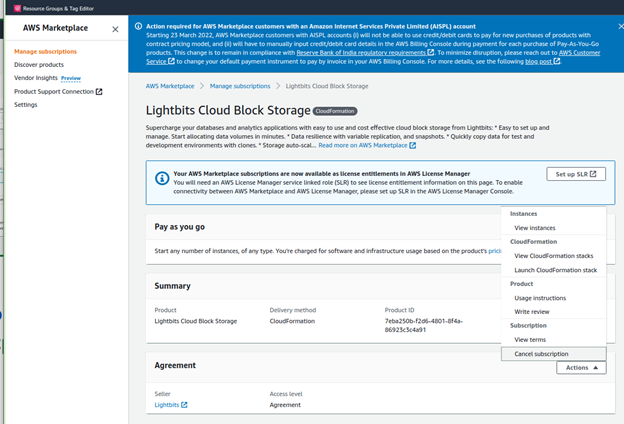
While logged in to your AWS account, go to AWS Marketplace subscriptions.
Select the Lightbits Cloud Block Storage product and click Cancel Subscription.
Last updated on
Was this page helpful?
Next to read:
CF Parameters© 2026 Lightbits Labs™
Discard Changes
Do you want to discard your current changes and overwrite with the template?
Archive Synced Block
Message
Create new Template
What is this template's title?
Delete Template
Message