
Creating a Volume from a Volume (Clone)
You can create an image using Cinder backup, and from that image create another volume, and boot your instance from that volume. You can take a snapshot of your original VM and create a second instance booting up from that snapshot. The hostname can be changed using cloud-init (or manually after the first boot).
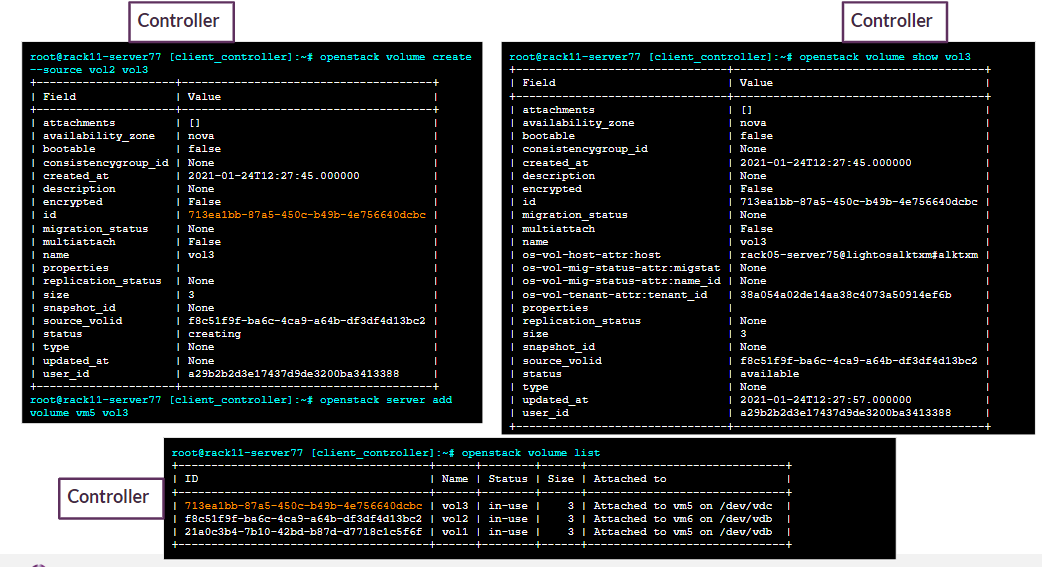
The following screenshot illustrates how to create a volume from a volume (clone) in Lightbits.
Cloning vol2 to vol3
openstack volume create --source vol2 vol3
openstack server add volume vm5 vol3
openstack volume show vol3
openstack volume list
Last updated on
Was this page helpful?
Powered by DeveloperHub
Next to read:
About - Legal© 2026 Lightbits Labs™
Lightbits Kubernetes CSI Quick Start Guide
Lightbits CSI Plugin Guide
Lightbits vCenter Configuration Guide
Lightbits OpenStack Driver Support
Lightbits OpenStack Driver - Legacy Support
Lightbits DMS Guide
Lightbits Cluster Federation
Proxmox Plugin (Tech Preview)
Intelligent Cluster Management (ICM)