
This article describes the Lightbits SSD Journaling feature. This feature provides a way to persistently store data written to a node that has not yet been written to the data disk - providing protection for data persistency in case of the event of a simultaneous power outage affecting multiple servers, on volumes with multiple replicas and even single server power outages on volumes with single replicas. This is similar to the protection previously provided by Data Center Persistent Memory Modules (DCPMM).
When using the SSD Journaling feature, each node in the cluster will store a journal entry for each write request for a short period of time, until the data is persistent on the data disks. Once the data is persistent on the data SSDs, the journal entry is no longer required and can be overwritten. If an abrupt failure occurs, after the node is restarted, it will recover any outstanding journal entries and persist them on the data SSDs. The Journaling device is designed for high performance with low latency, similar to cache mechanisms.
In Lightbits release v3.18.1, the SSD Journaling feature is available for new cluster installations or for new servers being added to an existing cluster working with DCPMM (Hybrid Mode). Although Hybrid Mode is supported, it is recommended as a temporary transition phase to migrate from a cluster working with DCPMM to a cluster working with SSD Journaling.
Adding a new server with SSD Journaling to a cluster with no DCPMM is currently not supported.
How it Works
Each storage node in a Lightbits cluster is responsible for maintaining its own health, and each node instance on a server (if it is a dual node instance server) independently monitors its own health as well. The diagram below illustrates a single Lightbits node, where the client is writing/reading from a volume that is handled by the node.
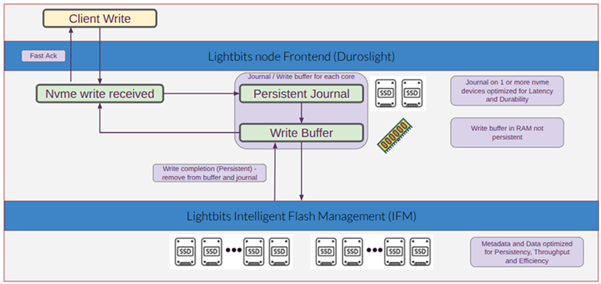
When a client issues a write request to the Lightbits node, the data is received by the Lightbits frontend (Duroslight). The data of the write request is written to the persistent journal and to the write buffer of each server holding a replica, and the write is acknowledged to the client. At the same time as the write is acknowledged, it is forwarded to the Lightbits Intelligent Flash Management (IFM). There, the data is written to the data SSDs. The data is striped across all disks and protected using Elastic RAID (when EC is enabled).
When a Lightbits node powers back on after a failure, it checks whether there are any remaining write entities in the journal that have not yet been persistently written to the data disks by the IFM. If such data is found, it is recovered from the journal and persistently written to the data disks. Once all pending data has been successfully written to the data disks, the node becomes active, initiates data rebuild from other nodes, and operations resume as normal.
When SSD Journaling is enabled, the cluster will be configured to a minimum replica count of one, This is similar to the configuration used with Persistent Memory (DCPMM).
Journaling devices are one or more SSD devices that are marked during installation to be used for journaling. It is recommended to use low latency, high endurance, write-intensive SSDs. See the Setting the Journal SSD Configuration documentation for additional information.
Multiple Journal SSD Devices
The SSD Journaling feature can run with one or more SSDs (up to a maximum of four) per instance. If you have configured more than one, the node will create a RAID0 device from the defined existing Journal SSDs.
As RAID0 striping is designed for performance, the more SSD Journaling devices you have, the better write performance you will get (up to a certain threshold). The number of SSD devices is defined during the installation process (see the Installation Guide for more details).
Future Lightbits releases will support adding/removing devices post-installation.