
Log streaming is a built-in observability capability of every Lightbits cluster. It enables cluster administrators, in real time, to route logs from Lightbits services (node-manager, cluster-manager, duroslight, gftl, etc.) directly to external log aggregation targets such as Grafana Loki or an Rsyslog server.
No additional packages, sidecar containers, or per-node configuration files are required. The entire pipeline is configured through the same JWT-authenticated REST API or lbcli binary used to manage cluster resources, and configuration changes propagate cluster-wide within approximately one minute without restarting any service.
Log Streaming Architecture
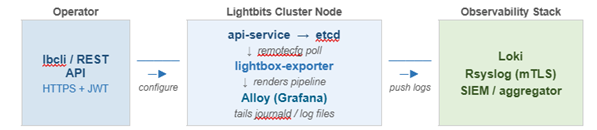
The log streaming pipeline consists of two components running on every cluster node:
lightbox-exporter - Reads source and target configuration from
etcdand renders a Grafana Alloy pipeline definition via theremotecfgendpoint.Alloy - Grafana's open-source telemetry collector. It polls
lightbox-exporterfor the rendered pipeline config, tails the configured log sources (journaldunits or log files), parses each entry according to its declared format, and forwards the result to all enabled targets.
Configuration is stored in etcd and rendered on demand. Updating a source's minimum log level, disabling a target for maintenance, or rotating a TLS bundle requires a single API call; all Alloy agents on all nodes pick up the change on their next remotecfg poll (default: 1 minute).
The image below illustrates the Lightbits log streaming architecture. Configuration is stored in etcd and propagated cluster-wide via remotecfg polling. Alloy collects from journald and log files, and then forwards to all enabled targets simultaneously.
Configuration Workflow
The following steps summarize the end-to-end configuration sequence.
Export credentials - Set your JWT and cluster endpoint in the shell environment.
(Optional) Create a TLS bundle - Required only for Rsyslog targets that use mTLS.
Create sources - Define which services or log files Alloy should collect.
Create targets - Define one or more log destinations.
Verify collector status - Confirm that all Alloy agents are online and that the pipeline is healthy.
Sources and targets are independent objects. A source can exist before any target is defined, and vice versa. Alloy begins forwarding logs only after at least one source and one enabled target are both present.